

2025-09-29 22:13:55
🚀 Quick Guide: Login with Cookie 🚀
Step 1: Install the extension Get Token Cookie
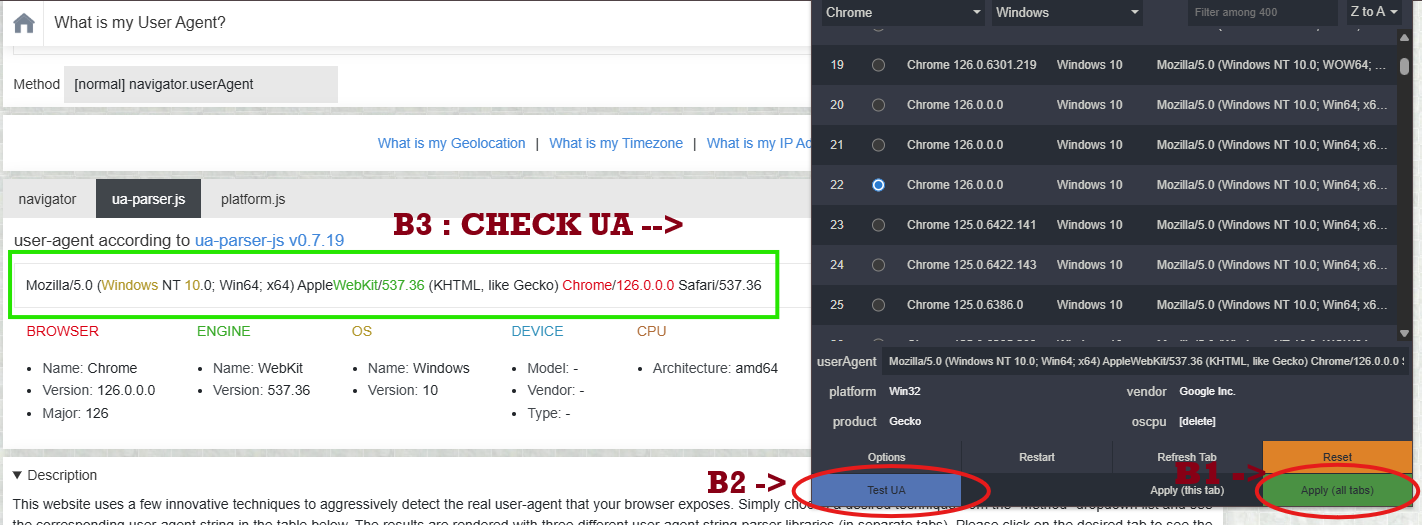
Step 2: Install the extension User Agent Switcher and Manager
Step 3:
Open the User Agent Switcher extension
Delete Chrome’s default userAgent
Add the original cookie’s user agent
Click Apply (All Windows)
Double-check the User Agent to make sure it’s correct in file account
Step 4:
Copy the cookie
Paste it into the Get Token Cookie extension

Click Import ✅
If the cookie dies, you can still log in using uid|pass as the device is already trusted.
IMPORTANT :
⚠️ Important: When buying a cookie, always ask the seller to provide the original user agent as well. Without it, if your login dies, that’s on you 🤷♂️
List Post

WARRANTY POLICY
2023-01-10 02:15:43

DISCOUNT POLICY FOR CUSTOMERS
2023-01-10 08:02:57

SHARE TOOL CHANGE PASSWORD FACEBOOK BY COOKIE
2025-09-22 19:51:02

INSTRUCTIONS LOGGIN BY COOKIE TO CHANGE PASS
2026-05-09 14:32:50

